
Estate agents
A window that is never showing a property you sold last month
Listing loops in the window, a branch board inside, and a screen that keeps working through the evening when most people walk past.
An estate agent’s window is the most valuable square metre the business owns and the hardest one to keep current. Cards are printed, laminated and clipped into a frame, and a property that went under offer on Tuesday is still in the window on Saturday because nobody wanted to reprint the set.
The people who most carefully read that window are walking past at seven in the evening, when the office is shut and the cards are in shadow. A lit screen is a different proposition entirely.
Signvero turns the window into a loop you change from a browser: a new instruction goes up the hour it is signed, a sale is flagged the day it happens, and the schedule keeps the glass bright well past closing.
What usually goes wrong
The starting point
- Printed window cards fall behind the moment a property goes under offer
- The window is dark at exactly the hour people read it
- Keeping several branches consistent means printing the same set repeatedly
A listing up the hour it is signed
Add it in the panel and it is in the window the same afternoon, with a photograph that is actually legible after dark.
Sold and under offer, flagged
A badge on the card rather than a gap in the frame, which is the version that builds a reputation.
Lit until late
A schedule runs the window loop past closing, when the street is at its busiest.
In practice
What goes on the screens
Six things this trade puts up, rather than six things a signage brochure says you could.
Featured property loop
Photographs, price, bedrooms and a QR code to the full listing.
New instructions
A clearly marked section for what came on this week, which is what regulars look for.
Sold and under offer
Flagged rather than removed, because it is the best evidence you have.
Valuation and lettings offers
The service message, between listings, on a loop.
Branch and team board
Inside the office, so a waiting client sees who they are about to meet.
Out-of-hours contact
A card that appears when the office closes, with the number and the website.
On the wall
What this looks like in a estate agent
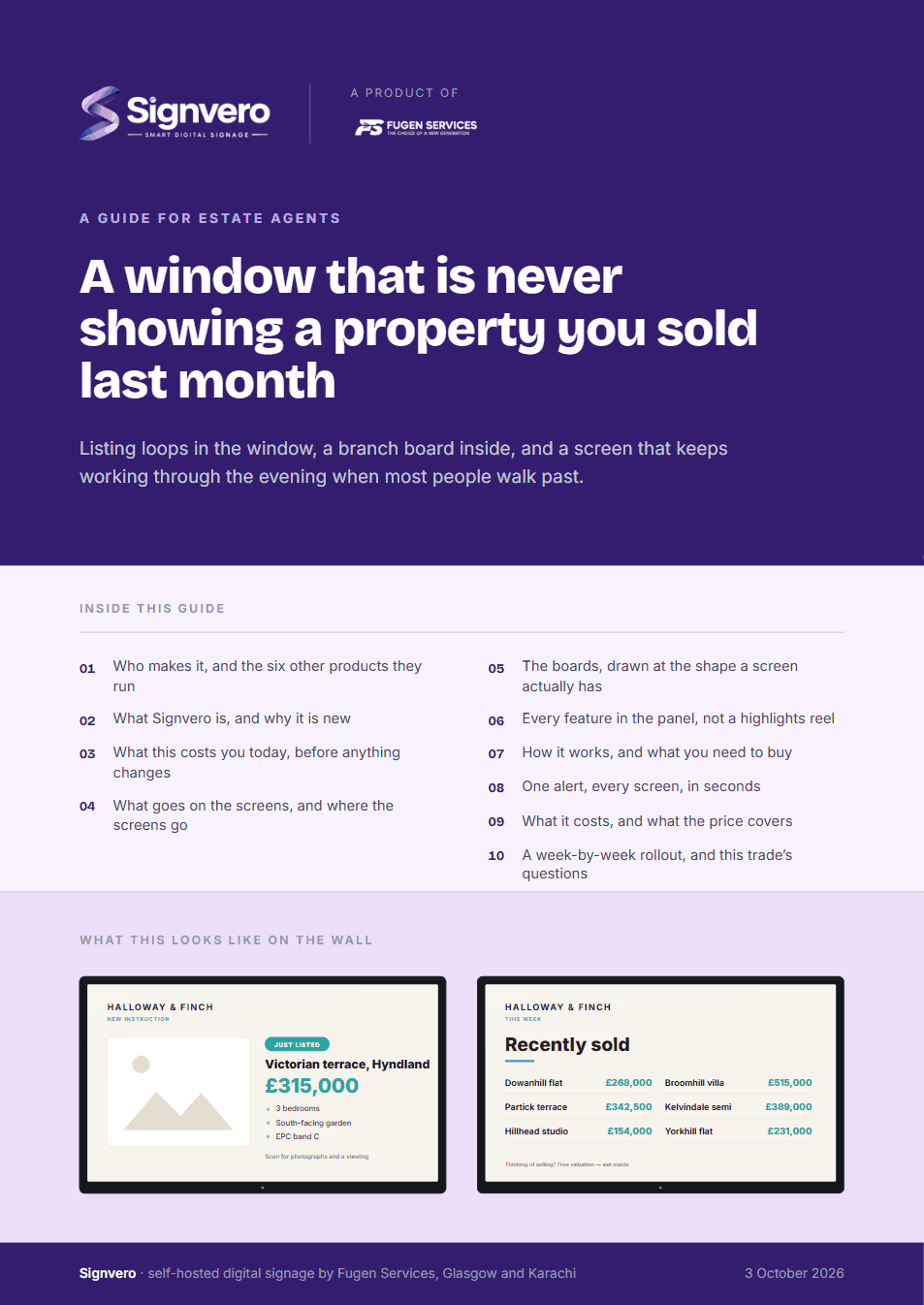
Two of the boards this trade runs. Both are built from a template in the panel, so the third one looks like the first and a price changed in one place is changed everywhere.
Placement
Where the screens go
The question every first conversation reaches within ten minutes. In the order most places buy them — and the first one is usually enough to start.
- 01The window, which is the whole business
- 02The office wall, for the branch and the team
- 03The meeting area, for valuations and lettings
- 04A second window pane, for sold and under offer
The moment that matters
One alert, every screen, in seconds
Everything else on this page is the ordinary day. This is the reason people actually buy it.

Take it with you
A guide for estate agents
17 pages: who builds it, what it does in this trade, mock-ups of the boards and of the panel itself, every feature rather than a highlights reel, what it runs on, and what it costs — priced in your own currency, with every band on one page. Written for the person who has to say yes.
PDF · 17 pages · A4
Before you ask
Questions from this trade
- Can listings come from our property software?
- Cards can be built in the panel, which suits a single branch, and a feed from your CRM or portal can be brought in through the API for a larger agency.
- Will the screen be visible in daylight?
- In a sunlit window you want a high-brightness commercial display rather than a television. The software is identical; we will say plainly which one your window needs.
- Can each branch manage its own window?
- Yes. Branches are groups, so each manages its own listings while head office can publish a campaign to all of them.
- Can we put a QR code on each property?
- Yes, and it is worth doing. It is the only way to measure what the window is actually generating.
Other settings
Where else this is used
Restaurants & cafés
Digital menu boards that change in seconds
Retail stores
Offers and pricing across every branch from one panel
Hotels & guest houses
Lobby, lifts, conference boards and wayfinding
Offices
Reception, meeting rooms, company news, fire drills
Factories & warehouses
Safety notices and shift boards that survive the network
Hospitals & clinics
Waiting rooms, wayfinding, and a channel that outranks everything
Schools & universities
Campus notices, timetables and lockdown messaging
Government & public sector
On-premise, auditable, and nothing leaves the building
Gyms & fitness studios
Class timetables, inductions and the screens by the weights
Salons & spas
Price lists, treatment menus and the wait at the chair
Pharmacies
Counter queues, health advice and the shelf behind you
Banks & finance
Branch queues, rates and compliance notices
Car showrooms
Stock on the floor, finance examples and the handover wall
Supermarkets
Aisle ends, fresh counters and the queue at the till
Mosques & places of worship
Prayer times, announcements and appeals
See it running on your own screens
We will set up a live system with your own login, and walk you through anything you want to see.
No open demo, no sign-up wall, a person reads every request.